Beyond the hype - how AI can help your business in the real world

Jon Richardson • March 1, 2026

Beyond the Hype: Why Marblism and Relay.app are Redefining Productivity


I've spent nearly two years testing AI tools. Honestly, most aren't worth it. They make big promises but only help you do tasks a bit faster—tasks you could already finish in ten minutes.


Sometimes, though, a tool comes along that truly changes how we work. Marblism is one of those. If you run a business or manage clients and ignore this shift, you risk falling behind.


This isn't just about using ChatGPT to write emails. It's about creating AI employees who handle the routine work, so you can focus on what really grows your business.


The Problem With "AI Productivity Tools"


Most AI tools have a big flaw: they work alone. You might use one for writing, another for scheduling, another for research, and another for CRM follow-ups. In the end, you spend more time managing tools than doing real work.


Sound familiar?


Real productivity doesn't come from adding more tools. It comes from integration—getting your systems to work together so you aren't stuck copying and pasting between platforms like it's 2008.


That's where Marblism and Relay.app come in. They're not competitors; they're both part of an ecosystem that's quietly changing how modern businesses work.


What Marblism Actually Does (And Why It Matters)


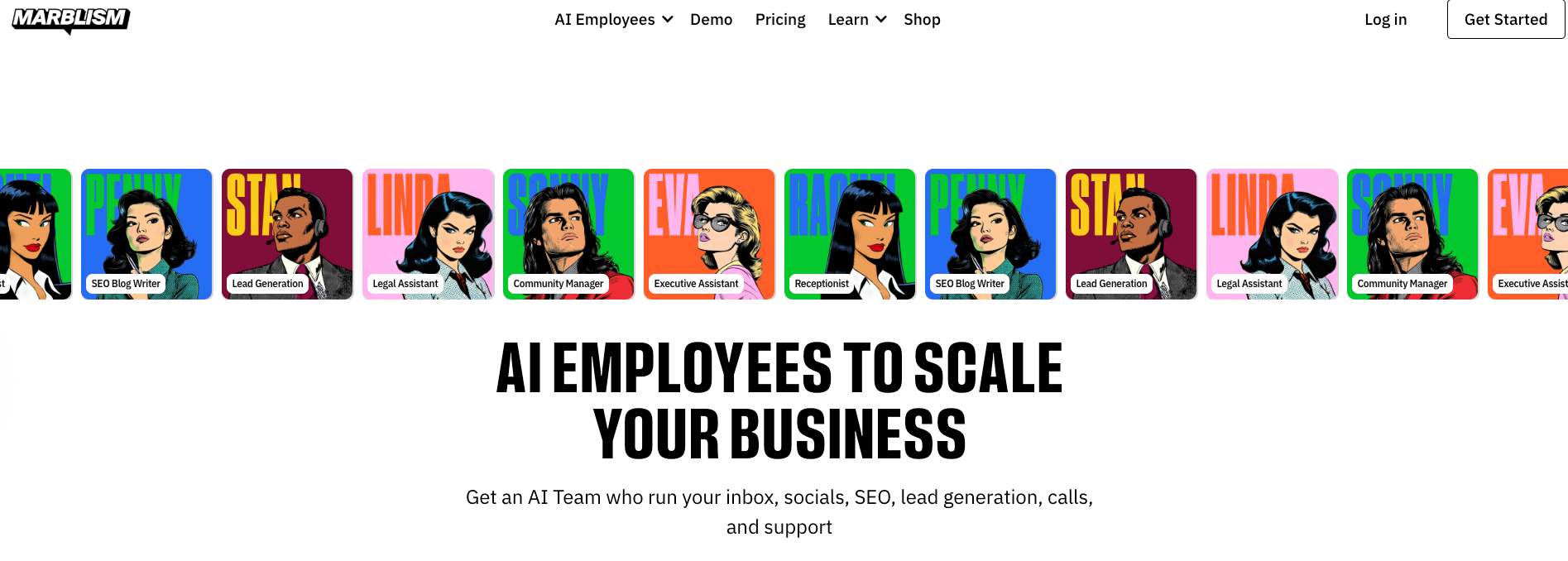
Marblism isn't a chatbot or just another AI writing tool. It's a platform that uses specialised AI Employees to handle specific tasks in your business.


Let me break that down.


Instead of you or your team sorting emails, drafting social posts, writing blog content, or researching leads, you can assign these tasks to AI Employees. They handle the work around the clock without needing supervision.


Think of it like this: you wouldn't hire one person to do sales, marketing, admin, and customer service. You'd hire specialists. Marbilism works the same way. You get:


  • Eva – An executive assistant who manages your inbox, flags priorities, and drafts replies
  • Sonny – A social media Manager who plans content calendars and adapts to your brand tone
  • Penny – A blog writer who researches topics and writes long-form content (and yes she did write this blog)
  • Plus specialists for lead gen, outreach prep, research, and more


Each one is trained for what it does best. And here's the kicker: they integrate with Gmail, Outlook, Instagram, Facebook, LinkedIn, X (Twitter): all the platforms you're already using.


No onboarding. No payroll. No, "I'm off sick today." Just consistent output at a fraction of the cost of hiring.


Speed to Market: The Real Competitive Edge


If you're running a business you already know the game: whoever moves fastest wins.  With traditional development, it can take weeks or even months to build custom workflows. By the time your system is ready, you might miss out on new opportunities.


Marblism changes that. You can set up an AI Employee in minutes instead of months. That means you can reply to leads in 10 minutes instead of 10 hours, and publish content weekly instead of quarterly.


The businesses that are winning today aren't the ones with the biggest budgets. They're the ones moving faster than their competitors.


The Integrated Ecosystem: Relay.app and Marblism


Here's where it gets interesting.


Marblism handles the execution layer: writing, researching, managing inboxes, and creating content. But productivity isn't just about doing tasks. It's about connecting systems so information flows without you having to lift a finger.


That's where Make.com and Relay.app come in.


Relay.app is the backbone of your automation. It connects your apps and services. For example, when a lead fills out a form on your website, it updates your CRM, sends a Slack notification, and starts a follow-up email sequence automatically. No manual data entry. No more forgetting to log things.


Relay.app lets AI make decisions within automations. For example, it can route emails based on sentiment, prioritize tasks as needed, or trigger workflows based on context instead of just following strict rules.


When you use all three together, you're not just automating tasks. You're building a smart operations layer that adapts, learns, and works without constant oversight.


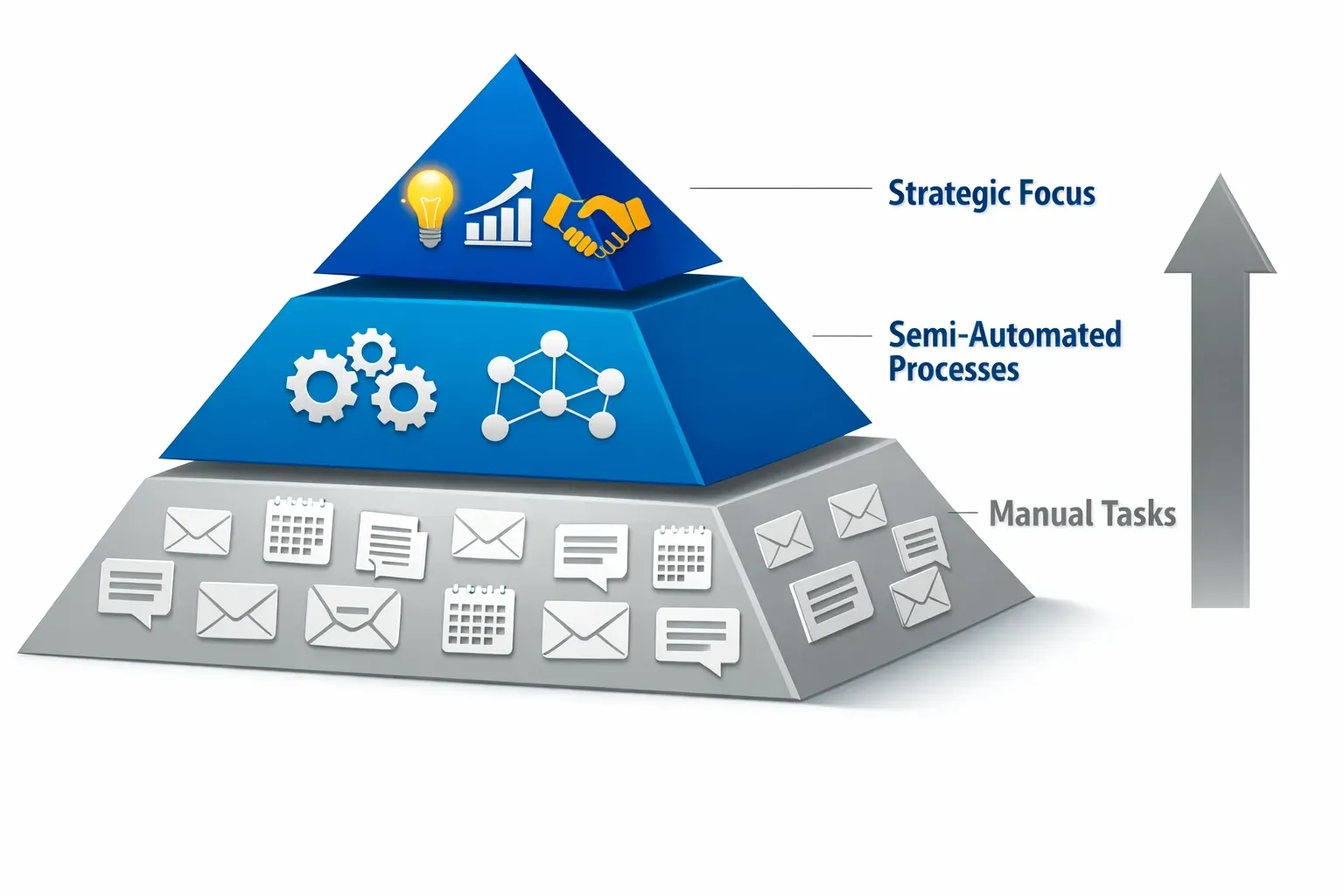
The Productivity Pyramid: Where Your Time Actually Goes


Most business owners spend 60-70% of their time on low-value admin work like managing their inbox, scheduling, following up on leads, posting on social media, and writing proposals.


That's not a strategy. That's maintenance.


The businesses that scale invert the pyramid: spending 70% of their time on high-level strategy, client relationships, and revenue-generating activities, while AI and automation handle the rest.

Here's what that shift looks like in practice:


Bottom layer (Manual grunt work): Inbox triage, data entry, content scheduling, basic research


Middle layer (Semi-automated workflows): Lead follow-ups, CRM updates, social media posting


Top layer (Strategic focus): Client strategy, partnerships, product development, creative direction

Marblism and the AI stack move the bottom two layers into the background. You're not getting rid of work; you're shifting your focus to what matters most.


Real-World Use Case: What This Looks Like in Practice


Let's say you run a web design agency. You've got a handful of clients, a few leads in the pipeline, and about 40 hours a week to make it all happen.


Here's my old routine:


  • Spend 90 minutes clearing your inbox.
  • Draft three social posts for the week.
  • Research blog topics, write content, and schedule it.
  • Follow up manually on my live leads.
  • Update CRM after every client call.


Sound familiar?


Here's my new routine’ now I have implemented Marblism and Relay:


  • Eva triages your inbox overnight, flags urgent items, and drafts replies to common questions.
  • Sonny plans your content calendar for the month and adapts the tone based on engagement.
  • Penny researches trending topics in your niche and drafts blog posts for review.
  • Relay.app automatically logs client calls to your CRM and triggers follow-up sequences.


You wake up, check what's been done, spend 30 minutes on approvals, and then use the rest of your day for real client work and strategy.


Oh, and I only rarely work at weekends


That's the difference between surviving and scaling.


Why This Matters for Credibility (And Why I'm Sharing This)

I'm not here to sell you software. I test AI tools all the time because my clients' results depend on staying ahead of what really works, not just what's popular on LinkedIn.


Marblism is one of the few platforms I've integrated into my own workflows at Overt Digital Media. It's genuinely shifted how we operate, particularly around content creation and client communication.


If you want to try it, here's my referral link: Explore Marbilism. To be transparent, I get a small reward if you sign up, but I'd recommend it anyway. It's cheaper than Netflix and much more useful.


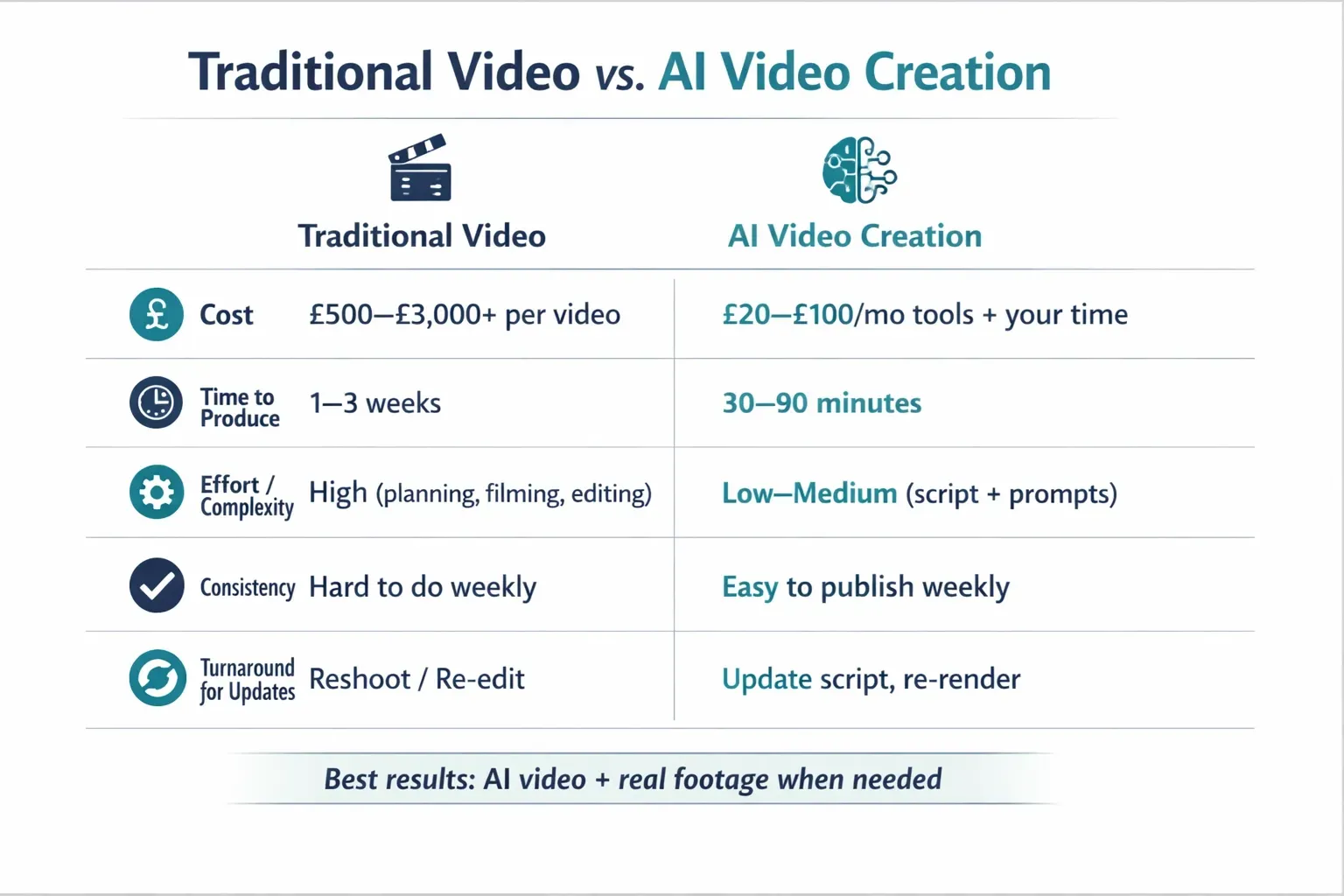
AI Video Creation: Weekly Credibility Without Weekly Video Budgets


Video is a massive leverage point for credibility and engagement. People in Dorset/Christchurch don’t want another brochure-style website or another “we’re great at what we do” post. They want to see you. Hear you. Get a feel for whether you’re legit before they enquire.


The problem? Traditional video is a pain.


If you’ve ever tried to “do video properly” you already know the blockers:


  • Time: planning, filming, editing, revisions… it eats days
  • Cost: a decent shoot + edit can easily run £500–£3,000+ per video
  • Consistency: you might manage one good video, but weekly? Not a chance


That’s why most small businesses never build momentum with video. Not because video doesn’t work. Because it’s too expensive to do often enough to matter.


This is where AI video tools remove the bottleneck.


Tools like HeyGen, Synthesia, and Descript let you produce polished videos without needing a crew every time:


  • Turn a script into a talking-head style video (with an AI presenter if you want)
  • Clean up audio, remove filler words, and tighten edits fast
  • Create multiple versions for different services/locations/offers in the time it used to take to edit one cut


You’re not using AI video to “fake” your business. You’re using it to ship more content, more consistently, without burning half your week.

Practical ways you can use AI video right now:


  • Weekly FAQ videos (“How much does it cost?”, “How long does it take?”, “What’s included?”)
  • Service explainers for landing pages (keeps visitors engaged longer)
  • Review-to-video repurposing (turn your best reviews into quick social proof clips)
  • Offer videos for seasonal promos (update the script and re-render in minutes)


If you can publish one solid video a week, you’ll look like the most active, most credible option in your market. That’s not branding. That’s a competitive advantage.


>>>Find out more about how AI Video Generation can help your business<<<
The Bigger Picture: AI as a Core Operation, Not a Side Tool


The businesses that win over the next five years won't be the ones with the most employees. They'll be the ones with the most intelligent operations.


AI isn't here to replace your team. It's here to help you and your team do more. It lets you compete with agencies ten times your size because you can work at their speed without their extra costs.


This isn't just theory—it's happening right now. The real question isn't if AI will change productivity, but whether you'll adapt before your competitors do.


Final Thought: Stop Managing Tools, Start Building Systems


If you're still doing the same tasks by hand every week, you're not really running a business. You're just managing a very expensive to-do list.

Switching to AI-based workflows isn't about learning to code or becoming a tech expert. It's about seeing where your time matters most and automating everything else.


Marblism, Make, and Relay aren't magic solutions, but they're the closest we have to giving small businesses the power of an enterprise without the high costs.


You don't need anyone's permission to get started. You just need to stop waiting.


Want to understand more about how AI can help scale your business?


Just complete the form below and one of the team will be in touch


Contact Us

By Jon Richardson August 8, 2026
Is your website costing you money each month You’ve already invested in a website. Maybe you put it together yourself one weekend, or perhaps you hired someone a few years back. Either way, it’s out there for everyone to see. But here’s the problem: it’s not helping your business. Each month, you pay for hosting, domain renewals, and maybe a few plugin subscriptions. But the biggest cost isn’t those monthly fees. It’s the steady flow of potential customers who visit your site, get confused, and leave for a competitor. When you think about redesigning your website, it’s easy to focus only on the upfront cost. You might think, "That’s money I could use somewhere else." But keeping an outdated or broken site running is rarely the cheaper choice. It could actually be your most expensive mistake this year. The Hidden Cost of an Underperforming Website Here’s what your current website might really be costing you behind the scenes: Lost enquiries every day: If your site loads slowly on a phone, or if visitors can’t tell what you do within five seconds, they leave. That’s not just lost traffic, it’s lost revenue. If you have Google Analytics set up, check your ‘Bounce’ rate - the number of visitors who leave (bounce) off your website within 10 seconds without taking further action. Wasted ad spend: If you run paid ads or social media campaigns pointing people to a site that doesn't convert, you are literally paying to for nothing Damage to your reputation: First impressions count. If your site looks like it’s from 2012, people may think your business is outdated too. When you think about all the missed phone calls and empty contact forms, a poorly performing website can cost you much more than fixing it ever would and the longer you leave it the more it will cost you. Looking at Your Website as an Investment Try to see a website update not as an expense, but as a way to earn money. A new website doesn’t have to be expensive. You don’t need fancy animations or complicated features. What matters is having a site that appeals to your customers, and is fast and clear, one that turns visitors into customers. When your website works well, everything changes. If a new site helps you get just two or three more clients each month, it quickly pays for itself.  How to Know When It’s Time for a Change You don’t need to be a marketing expert to spot when your site is outdated. Ask yourself these three questions: Can someone figure out how to work with you within ten seconds of landing on your homepage? Don’t trust your own judgement here, ask someone who doesn't know your business Does the site load quickly and look good on your phone? Do you need to pinch or zoom at any point? Do people actually use your site to contact you, or is it just sitting there like a digital business card? If you answered no to the first two, or yes to the last one, your current setup is costing you more than you think. You don’t have to spend a lot to fix it. Take a look at our clear pricing options to see how easy it can be to upgrade your online presence, or contact us to discuss what a lead-generating website could look like for your business.
By Jon Richardson July 30, 2026
The difference between damaging your reputation and improving your service The main concern most business owners have about AI receptionists is not whether the technology works, but whether it will harm their reputation. You've put in years of effort to build up trust with your customers, since they know you. The idea of them hearing a mechanical voice, realising they're speaking to a machine, and then quietly wondering if you've cut your budget is a genuine worry—and it calls for a serious response, not just some marketing nonsense. The real fear If you picture an AI answering your phone, you'll most likely have an image something like this: it will be flat, show no emotions, and lack social awareness. Its voice will at once make the person who is calling think "I'm speaking to a machine". It's the sort that stumbles when someone has a rather unusual name or puts in a question that is only slightly unexpected. It's the kind that makes you seem as though you've cut corners in your customer service. It seems risky for someone who is a plumber, electrician, accountant, or consultant since your phone is usually the first point of contact and a poor experience at that stage can result in you losing the contract before you've even produced a quote. The second concern is more subtle. Even if the AI functions perfectly, certain customers could still be put off by the fact that it is automated. They may not call us again next time and might tell their friends, "Yes, they've gone fully automated now." This kind of reputational risk seems genuine since, to some extent, it is. What’s actually changed Actually, there has been a remarkable improvement in AI voice quality over the past 18 months; the best systems no longer come across as obviously robotic and instead sound as if they are being spoken by a real person—specifically, a professional receptionist having a normal conversation. However, there is an important exception: not all AI receptionists are the same. Some do sound natural. Others still sound as if they have been processed. And the difference is very significant. A good AI receptionist should: Sound conversational, not scripted. Handle common accents and speech patterns without stumbling. Pause and think (just like a human receptionist does) Ask sensible follow-up questions. Know when to hand over to a human without making it awkward. The higher-quality ones manage to do it well, while the cheaper ones don't, and your customers will be able to tell the difference. The customer experience question That's where things become interesting. You could think that customers dislike speaking to AI, but research and practical experience indicate a more complicated situation. Customers are usually not upset when an AI receptionist is used, provided it actually deals with their issue. They telephone to book an appointment, report a problem, or obtain basic information. They are often content with this arrangement if the AI can look after it within thirty seconds; and they are certainly satisfied with it if the other option is to wait on the phone for five minutes or having to call back during business hours. The issue isn't the AI itself, but rather with a poor-quality AI that causes it to repeat itself, fails to understand, or forces them into a frustrating conversation; it's that kind of experience which is negative. As for a good one, most customers never even notice it. Even so, the risk is there. Certain customers—especially older ones or those with more complicated requirements—may prefer to speak to a human. They may feel more at ease booking with a live person, and there is merit in that confidence, particularly in cases where trust is important. Where the real risk is (and where it isn’t) An AI receptionist works well when: Most of your calls follow a predictable pattern (booking appointments, taking messages, basic troubleshooting) Your customers are comfortable with technology. Your business model benefits from handling calls 24/7 You’re solving the “missed call” problem (calls coming in when you’re with other clients) An AI receptionist is risky when: Every call is complex and needs expert judgment. Your brand position depends on the personal touch. You’re using it as an excuse to avoid hiring. You’ve chosen a cheap system with mediocre voice quality. The honest trade-off As long as you select the right AI receptionist and use it correctly, it won't make you come across as cheap; on the contrary, it usually makes you sound professional and well organised. A response such as "Thanks for calling; I'll get someone to you shortly" given by a system that sounds natural seems competent. But it will make you sound cheap if you: Use a system with obviously robotic audio. Let it fumble through calls instead of handing to a human. Configure it to sound generic and corporate instead of like your business. Use it to avoid hiring when you actually need staff. The true skill lies in being able to tell the difference between using AI for high-volume, low-complexity tasks (which is a proper use) and using it to completely bypass customer service (which is a wrong use); the first option allows your team to focus on higher-quality work, while the second only serves to annoy customers. What you should actually test Before you decide on using an AI receptionist, listen to actual examples. Not demonstrations in which they have rehearsed the conversation, but real calls, complete with awkward pauses and unexpected questions. Ask the provider: May I get some feedback on the way it deals with people who don’t adhere to the script? What does it sound like when it does not understand something? How does it pass over to a human? Could it deal with the particular terminology used by my business? So what is my customer data actually like in your system? If they won’t give you honest answers to those questions, that’s a red flag. If the audio samples all sound slightly too perfect, that’s another one. The better providers are transparent about their limitations. They know they won’t be right for every business. They know some calls need a human. And they’re happy to show you exactly what that looks like. Test our AI Receptionist - Lucy. Call 07441 350210 to talk to her directly  The bottom line It's not silly of you to be concerned about customer experience; in fact, that's precisely the right thing to be thinking about. However, the issue isn't whether an AI will damage my reputation; it's whether this AI, when used in this way, will improve or damage my reputation. The answer depends entirely on the item you are purchasing, how you set it up, and whether you are using it to improve your service or replace it. A good AI receptionist should not come across as a way of cutting costs; it should give the impression that you have improved your systems, and that's precisely what you do have if you handle the situation correctly. Learn more about how an AI Receptionist can help your business
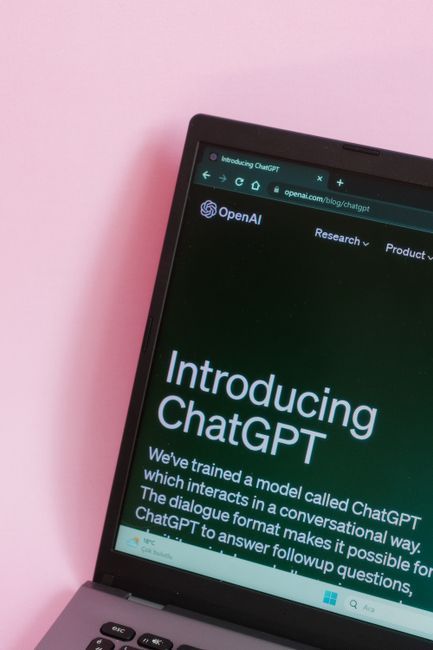
Laptop screen showing the ChatGPT homepage on a dark interface against a pink background
July 30, 2026
Most business websites are just digital brochures. They look professional, explaining what you do, listing your services, but not generating leads.
By Jon Richardson July 4, 2026
If your website were your sole source of leads, would you have a business today?
By Jon Richardson June 29, 2026
How to get found in AI Things are different now. For a long time, small business owners were told to aim for page one on Google. You worked on keywords, updated your meta tags, and hoped it would pay off. But now, the way people find your business is changing quickly. Google’s search results are starting to be replaced by AI Overviews . Instead of scrolling through links, people now ask ChatGPT, Gemini, and Perplexity for recommendations. These tools are not just search engines; they are answer engines. If your website isn’t set up for Large Language Models (LLMs), your business may not show up for the AI assistants your customers use. Here’s what you should know to stay visible in today’s digital marketing world. Stop Thinking Keywords, Start Thinking Context Traditional SEO focused on matching words. If someone searched for "plumber in Christchurch," you made sure that phrase was on your page. LLM optimisation, sometimes called Generative Engine Optimization (GEO), is different. AI models look for understanding, not just keywords . AI reads your site to learn who you are, what you offer, and how trustworthy you seem. When someone asks ChatGPT, "Who is the best web designer for a small law firm in Bournemouth?", the AI checks its training data and the web for the best answer. If your site only has keywords and lacks clear context, the AI will ignore it. The AI Playbook: 3 Ways to Get Recommended To show up in AI-generated answers, your website should be a main source of reliable information. Here’s how you can do that: 1. Use the "Inverted Pyramid" for Answers AI models work quickly and want answers right away. Set up your service pages like a news article: The Direct Answer: Start with a 50-60 word summary that explicitly states what you do and who it's for. The Context: Next, explain how you work, why you do it that way, your process, what makes you different, and your local knowledge. The Proof: Finish with facts, customer testimonials, and real case studies. If you run a cleaning company in Southampton, don’t hide your list of services at the end. Let the AI and your visitors know what you offer right at the start. 2. Turn Headings into Questions People talk to AI. They ask things like, "How much does a new website cost in Dorset?" or "What's included in a social media management package?" Instead of a plain heading like "Our Prices," try a question such as "How much do our web design services in Christchurch cost?" This makes it much easier for an LLM to match your content to what users ask. 3. Make the Most of Structured Data (Schema) Schema Markup is a special language for machines. It’s code that tells AI your business name, your address in the New Forest, your opening hours, and your service categories. At Overt Digital Media, we make sure every site we build uses advanced SEO and schema tagging. This way, when an AI bot visits your site, it doesn’t have to guess your details. It knows them for sure. Why Local Authority Still Wins AI models care about how close you are and your reputation. They look for real businesses with a strong presence. That’s why it’s more important than ever to be consistent across the web. If your address is different on social media and your website, it can confuse the AI. Whether you run a micro-pub in Bournemouth or work as an IT specialist in Southampton, keeping your Name, Address, and Phone (NAP) consistent across Dorset and Hampshire signals to AI that your business is real and trustworthy. Is Your Website Ready for the AI Shift? The shift from traditional search to AI-driven answers isn’t coming; it’s happening right now. The businesses that adapt today will be the ones ChatGPT and Gemini recommend as top choices tomorrow. Don’t let your business disappear online. Make sure your website is speaking clearly to these new AI models. Is your website AI-ready? Get a free website audit today and we'll show you exactly where you stand and how to start ranking for the future.
By Jon Richardson June 24, 2026
This is a subtitle for your new post
By Jon Richardson June 20, 2026
Do you really need an AI Agency in 2026?
By Jon Richardson June 8, 2026
This is a subtitle for your new post
By Jon Richardson May 18, 2026
How to Choose the Right AI Agency for your business The AI gold rush is in full swing. Spend five minutes on LinkedIn or at any networking event, and you’ll see plenty of AI consultants. That’s the problem. Every agency is suddenly an "AI agency." Every consultant is an "AI expert." Strip away the buzzwords, and most business owners are left asking a very fair question: What am I actually paying for here? If you're thinking about bringing AI into your business, and you should be, you’re probably not looking for something flashy. You want less admin. Fewer repetitive jobs and more time for the work that actually matters. That’s really what this comes down to. The right partner helps you get time back. The wrong one gives you an expensive toy you won’t use. So if you're trying to work out who actually knows their stuff and who’s just rebranded last week, here’s how to tell. 1. Don’t be blinded by the technology The biggest mistake you can make is hiring someone who talks about technology before they understand your business. You’ve probably heard the pitch before. We can install this clever tool. We can build that smart assistant. Fine. But if they haven’t asked how your enquiries come in, where jobs get stuck, or what your team keeps doing manually every single day, they’re guessing. A good partner starts with questions like: "What happens with inbound leads?" "Where do things slow down?" "What are you doing several times per day?" "What takes up time and headspace for no good reason?" That’s the real starting point. Not the software. Not the demo. Not the dramatic promises. If they can’t clearly explain why something will make your day easier, save your team time, or remove a bottleneck, it’s probably not the right fit. If getting a few hours back each week sounds useful, get in touch, and we’ll help you spot the obvious time drains. 
By Jon Richardson April 11, 2026
Let’s be honest: you’re probably tough to contact That’s not a criticism. It just means you’re successful. Whether you’re a solicitor in Christchurch, a high-end salon owner in Bournemouth, or a trade specialist in the New Forest, you’re busy, in meetings, on-site, and focused on the work that keeps your business running. Here’s the issue: while you’re focused on your work, you’re missing new opportunities. When a contact form goes unread for hours, or a call goes to voicemail, you’ve effectively lost that lead you have worked so hard for. In today’s world, the fastest responder wins—not just the one who offers the best service. If you slow your sales process, you could lose leads before you even speak with them. The Brutal Reality of "Speed to Lead" People expect quick answers. If someone in Bournemouth needs a service at 7:35 PM on a Saturday, they want their problem solved right away or at least to know that someone will help as soon as possible. Your chances of converting a lead drop by 80% if you wait more than ten minutes to respond. By the time you finish a coffee or a client call, your lead may already have contacted someone else. If you’re not the first to answer or reply, you risk losing out. Today’s customers see slow responses as unreliable. If you take two days to respond to a quote request, they might think the whole job will take much longer. The Manual Bottleneck: Why You Are the Problem Most business owners we meet at Overt Digital Media value their personal touch. They like to answer emails themselves and to be the voice on the phone. But this approach may slow your growth. Think about your current process: A potential customer fills out a form on your website. An email notification lands in your inbox (among 50 other emails). You see it 45 minutes later while grabbing lunch. You tell yourself, "I'll reply when I get back to the office." You get back to the office, get distracted by an urgent issue, and finally reply at 6:00 PM. By 6:00 PM, that lead has already booked a consultation with another s eo agency in Christchurch or a different local provider who has a system in place to catch them instantly. Manually following up is tiring and inconsistent. It often makes you switch tasks, breaking your focus and lowering productivity. You end up doing admin work for free and missing out on income. Enter the 24/7 Gatekeeper: The AI Receptionist The most common problem is missing phone calls. You might be on another call, driving, or simply taking a break from work. Voicemail rarely works for leads. Fewer than one in ten people leave messages; most just hang up and call someone else. This is where an AI Receptionist comes in. Unlike a traditional answering service, which just takes a name and number. An AI receptionist can actually handle the inquiry. It can answer questions, qualify leads, and even book an appointment directly in your calendar. Picture a client calling your business at midnight. Instead of no going through to voicemail, they reach an intelligent assistant who answers their questions and books a meeting for Monday morning. You wake up to a full calendar, and your client feels confident. This is how you stay ahead without answering every call yourself. Book a demonstration of our AI Receptionist