Google Maps SEO Vs Local SEO

Jon Richardson • May 29, 2024

The best way to rank your website highly in your local area!

Local SEO vs. Google Maps SEO: What's the Difference and How Can They Work Together?

The business world has changed over the decades, much of which has been due to new technology. No bigger change has been witnessed than what we have seen in the last two decades with the introduction of search engines.

Initially, it was easy to get found online, but as the number of websites increased exponentially, it has become increasingly difficult, if not impossible, to be found on the web without investing in Ads or SEO. But in this digital arms race, innovation is required, especially when competing with much bigger organisations that have much deeper pockets.

So, how do you, as a small business, compete against a company with a much bigger marketing budget? One answer is Google Maps SEO!

Search engine optimisation (SEO) can be confusing, particularly regarding local search. Two terms that often come up are local SEO and Google Maps SEO. While they are interrelated, they represent distinct strategies with unique goals. This article will delve into the differences between local SEO and Google Maps SEO, explore how they work together, and provide actionable tips to leverage them for optimal local search success.

Whether your priority is attracting walk-in traffic or establishing yourself as a local authority in your industry, understanding the key tactics involved in both Google Maps SEO and Local SEO empowers you to unlock significant growth potential. By the end of this blog, you'll be equipped with the knowledge and actionable steps to take control of your local SEO strategy and watch your online visibility soar, ultimately attracting more customers and driving success for your local business.


Understanding Local SEO


Local SEO encompasses a comprehensive set of strategies to increase a business's visibility in local search results. Imagine it as building a strong, well-maintained building in a prime location. Local SEO focuses on factors influencing how a business appears in organic (non-paid) search results for location-specific searches. Here are some key aspects of local SEO:


  • Keyword Research: Identifying relevant keywords that potential customers in your area are searching for, such as 'SEO agency near me' or 'Website Designer in Christchurch'. These keywords should include location qualifiers like "city" or "near me" alongside your industry terms.
  • On-Page Optimisation: Optimise your website content, including Page Headings, title tags, meta descriptions, and local landing pages, to incorporate these location-specific keywords.
  • Google My Business (GMB) Optimisation: Claiming and optimising your Google My Business profile with accurate and up-to-date information like address, phone number, category listings, and high-quality photos.
  • Local Citations: Building citations, which are listings of your business name, address, and phone number (NAP) in online directories and websites such as yell.com and free index, etc. Consistency in NAP citations across platforms is crucial.
  • Positive Online Reviews: Encouraging satisfied customers to leave positive reviews on Google, Trustpilot, Checkatrade and other relevant platforms. However, Google reviews should be your priority as they significantly impact your SEO rankings. Responding to both positive and negative reviews demonstrates professionalism and builds trust.


Local SEO strategies create a robust online presence that search engines can easily understand and rank favourably for local searches.


Google Maps SEO


Google Maps SEO, sometimes called Map Pack SEO, focuses specifically on improving a business's ranking and visibility within the Google Maps platform.


What is the Map Pack?


The Map pack is the section of Google Maps that appears towards the top of the search engine results page (SERP) just under the Sponsored (paid) listings.
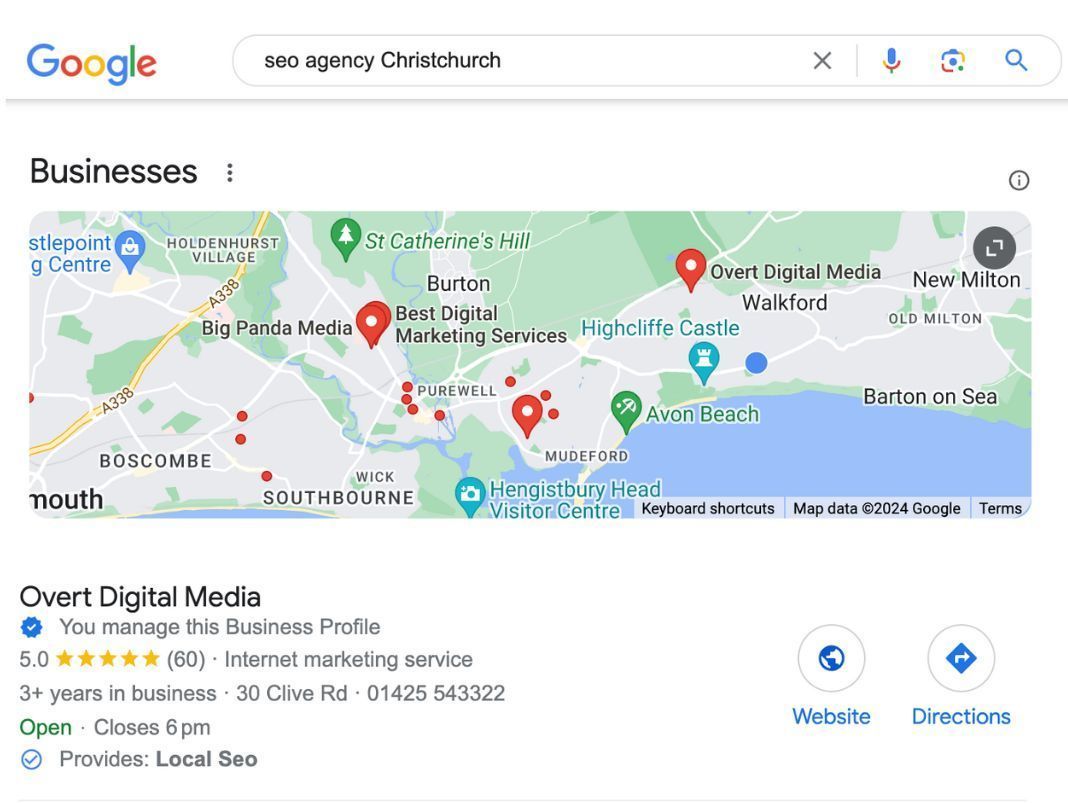


Why is the MapPack important


Besides its proximity to the top of the search results for any given search, Maps Pack results are prioritised for localised searches such as 'SEO Agency Near Me' or 'Web Designer in Christchurch'. Additionally, many potential customers will choose a provider based on a combination of proximity and the number of good reviews, often without even visiting your website.


There is an overlap with Local SEO, but there are significant differences as well. Think of it as the bright, eye-catching signage on your well-maintained building. While local SEO is the foundation, Google Maps SEO puts your business on the map (literally!).


Here's what Google Maps SEO involves:


  • Optimising GMB Profile: This includes keeping your profile information accurate and consistent, utilising high-quality content such as photos, videos, and curated posts, responding to reviews promptly, and leveraging features like Google Posts to keep your audience engaged.
  • Category Selection: Choosing the most relevant categories to represent your business on Google Maps accurately.
  • Encouraging Customer Reviews: Positive reviews are a significant ranking factor in Google Maps.
  • Location Signals: Ensuring your business address is accurate across all online platforms and citations.
  • Proximity to Searches: Businesses closer to a searcher's location tend to rank higher in map results.


By optimising your Google Maps presence, you increase the chances of your business appearing prominently in the map pack. This section displays three local businesses for a particular search. This prime location can significantly boost your visibility to potential customers searching for businesses in your area.


The Power of Google Maps SEO


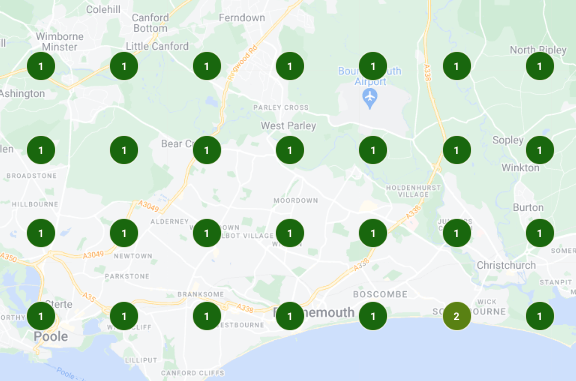
Below you can see the results of a successful Google Maps SEO campaign we conducted recently.
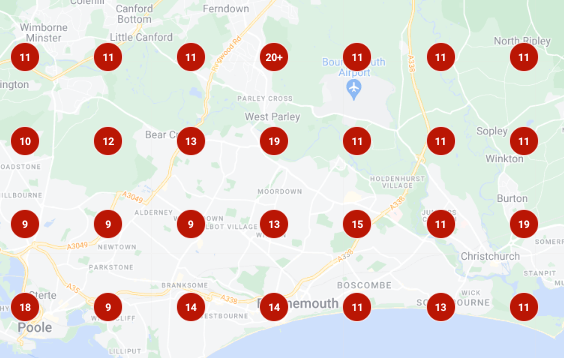
Local SEO and Google Maps SEO Working Together


While local SEO and Google Maps SEO have distinct areas of focus, they should be regarded as complementary strategies. Here's how they work together:


  • Local SEO strengthens Google Maps SEO: A well-optimised website with strong local SEO signals sends positive messages to Google about your business's legitimacy and local relevance. Both Local SEO and Google Maps SEO improve your ranking across Google.
  • Google Maps SEO enhances local SEO: A well-optimised GMB profile with positive reviews and frequent engagement tells Google that your business is active and trusted by local customers.
  • Google always wants to return 'good' results on any search engine results page (SERPs), and reviews are one key way that Google can ascertain whether your business is a good result for any specific search.
  • Combined Impact: When local SEO and Google Maps SEO work together, they deliver much better results than either one will on its own. A strong online presence and a prominent map listing significantly increase your chances of attracting local customers.


Your Local SEO and Google Maps SEO Checklist


Here are some practical steps you can take to leverage the combined power of local SEO and Google Maps SEO:


  1. Claim and Optimise your GMB Profile: This is the first and most crucial step. It puts you on Google Maps and local search results, ensures accurate business info, helps you rank higher, and lets you connect with customers through reviews, posts, and photos. It's the foundation for local SEO and a must-have for attracting more customers.
  2. Conduct Keyword Research: Keyword research is essential for local SEO because it helps you target the specific phrases people in your area are searching for. Including these keywords in your website content and GMB profile description makes your business more likely to appear in relevant local search results. This can significantly increase your visibility and attract more potential customers.


There are many tools available, including free tools such as Google Keyword Planner and Google Trends or paid options like SE Ranking, Ahrefs, or SEMrush. You can identify the specific search terms people in your area use to find businesses like yours. Integrating these keywords into your website content and GMB profile descriptions increases your business's ranking in relevant local searches, boosting visibility and attracting more customers.


  1. Build Local Citations: Use online directories and relevant websites in your area to build citations with accurate NAP information.
  2. Encourage Positive Online Reviews: Respond promptly and professionally to all positive and negative reviews. Positive reviews are a ranking factor while addressing negative reviews demonstrates customer care.


Encouraging and responding to reviews is one of the most powerful ways of attracting new customers. The social proof provided by other people explaining how good your products or services are is not to be underestimated. It should be a core area of focus in your marketing strategy.


Your Google Business Profile makes it easy to request reviews, allowing you to send a link via email, text, WhatsApp, etc.  Not only are Reviews easy to request, but they also cost nothing other than a little time.


  1. Maintain Website Freshness: Regularly update your website content with fresh, local information. This could include blog posts about local events, industry updates relevant to your location, or new products or services offered specifically to your local clientele.
  2. Utilise GMB Posts: Regularly share updates, promotions, and events on your GMB profile through Google Posts. Engaging content keeps your business relevant and drives user interaction.


Keeping your Google My Business (GMB) profile fresh with regular updates is essential for local SEO success. These updates could include updates on promotions, events, and business information. Search engines favour active profiles, so consistent updates signal that your business is relevant and trustworthy. This can improve your ranking in local search results and attract more potential customers actively searching for your offer.


  1. Track Your Results: Monitor your website traffic, track your ranking in local search results and Google Maps, and analyse customer reviews. This data will help you refine your strategies and identify areas for improvement.


By consistently implementing these strategies, you can establish a dominant online presence and leverage the combined power of local SEO and Google Maps SEO. Remember, SEO is an ongoing process. Stay informed about the latest trends and best practices to optimise your online presence and attract more local customers.


SEO can feel overwhelming, especially when deciding which approach best suits your business. Both Google Maps SEO and Local SEO offer powerful tools but cater to slightly different needs. Here's a breakdown to help you determine the champion for your local business:


Focus on Google Maps SEO if:


  • Walk-in traffic and calls are your lifeblood: Brick-and-mortar businesses like restaurants, cafes, or retail stores heavily rely on attracting customers who are physically nearby. Google Maps SEO ensures prominent placement within the coveted Google Maps 3-pack, putting your business name and location directly in front of potential customers searching for what you offer.
  • Visual appeal is key: Google Maps listings allow you to showcase high-quality photos and videos of your business. This is a powerful tool for restaurants to entice customers with mouthwatering food pictures or for retail stores to highlight their inviting atmosphere.
  • You are in a town with a high population: If there is more than enough work for your business in a 10- —or 20-mile radius, Google Maps SEO will help you attract more customers from that area.


Focus on Local SEO if:


  • Your service area extends beyond immediate surroundings: Service-based businesses like surveyors or financial advisors often target a wider geographic area. Local SEO helps you rank higher in local search results across Google, not just maps, ensuring your business shows up for searches within your designated service area.
  • Your target audience searches for your services online: Many businesses, like accountants, lawyers, or personal trainers, attract customers who initiate their search online. Local SEO helps you climb the ranks in organic search results, making you more discoverable for people actively searching for your services.


For the best results: Embrace Both! Local SEO & Google Maps SEO


While the choice might seem like Google Maps SEO vs Local SEO, the best results often come from a combined effort. By implementing both strategies, you create a powerful synergy that:


  • Maximises visibility: Capture attention across Google Maps and organic search results, ensuring your business is seen by potential customers searching for you in various ways.
  • Builds trust and authority: Consistent optimisation across platforms signals to search engines that you're a relevant and active business in your local area.
  • Attracts a broader audience: Reach both those searching specifically on Google Maps and those browsing organic search results for your services.


Remember, regardless of your chosen approach, claiming and optimising your Google My Business profile remains crucial. It's the foundation for both Google Maps SEO and Local SEO, and you need to pay attention to it to limit your online potential.


Ultimately, the best approach depends on your unique business goals and target audience. By understanding the strengths of Google Maps SEO and Local SEO, you can make an informed decision and leverage the power of both to achieve local SEO dominance and attract more customers through your doors.


Conclusion


In conclusion, Google Maps SEO and Local SEO are intertwined strategies to supercharge your local online presence. However, they have distinct strengths that cater to different business needs.


  • Google Maps SEO: Focuses on optimising your Google My Business (GMB) profile for prime placement within the Google Maps platform, specifically the coveted 3-pack of businesses displayed for local searches. This is ideal for companies with a strong physical presence and focusing on attracting walk-in traffic or calls. Benefits include increased visibility within Google Maps, improved click-through rates due to prominent placement, and the ability to showcase customer reviews and business information directly.
  • Local SEO: This broader strategy encompasses optimising your website and online presence for local search results across Google, not just maps. It involves tactics like keyword research, building local citations (NAP consistency across directories), and local content creation. Local SEO is well-suited for businesses with a service area or targeting a wider local audience beyond immediate foot traffic. Benefits include improved ranking in local search results (both maps and organic listings), attracting customers searching for your services online, and establishing your business as a local authority.


Choosing the right approach depends on your business goals. If attracting local customers is your priority, focus on Google Maps SEO to secure that coveted 3-pack spot. If your target audience searches for your services online or has a broader geographic reach, focus on Local SEO strategies. The best scenario? Implement both! Combining Google Maps SEO and Local SEO creates a powerful synergy that significantly increases your online visibility, builds trust with local customers, and ultimately drives more business.


Remember, a strong online presence is key to local success. Regardless of your chosen approach, prioritise claiming and optimising your GMB profile, respond to reviews, and engage with your local audience online.

Request your free SEO & Website audit

By Jon Richardson July 30, 2026
The difference between damaging your reputation and improving your service The main concern most business owners have about AI receptionists is not whether the technology works, but whether it will harm their reputation. You've put in years of effort to build up trust with your customers, since they know you. The idea of them hearing a mechanical voice, realising they're speaking to a machine, and then quietly wondering if you've cut your budget is a genuine worry—and it calls for a serious response, not just some marketing nonsense. The real fear If you picture an AI answering your phone, you'll most likely have an image something like this: it will be flat, show no emotions, and lack social awareness. Its voice will at once make the person who is calling think "I'm speaking to a machine". It's the sort that stumbles when someone has a rather unusual name or puts in a question that is only slightly unexpected. It's the kind that makes you seem as though you've cut corners in your customer service. It seems risky for someone who is a plumber, electrician, accountant, or consultant since your phone is usually the first point of contact and a poor experience at that stage can result in you losing the contract before you've even produced a quote. The second concern is more subtle. Even if the AI functions perfectly, certain customers could still be put off by the fact that it is automated. They may not call us again next time and might tell their friends, "Yes, they've gone fully automated now." This kind of reputational risk seems genuine since, to some extent, it is. What’s actually changed Actually, there has been a remarkable improvement in AI voice quality over the past 18 months; the best systems no longer come across as obviously robotic and instead sound as if they are being spoken by a real person—specifically, a professional receptionist having a normal conversation. However, there is an important exception: not all AI receptionists are the same. Some do sound natural. Others still sound as if they have been processed. And the difference is very significant. A good AI receptionist should: Sound conversational, not scripted. Handle common accents and speech patterns without stumbling. Pause and think (just like a human receptionist does) Ask sensible follow-up questions. Know when to hand over to a human without making it awkward. The higher-quality ones manage to do it well, while the cheaper ones don't, and your customers will be able to tell the difference. The customer experience question That's where things become interesting. You could think that customers dislike speaking to AI, but research and practical experience indicate a more complicated situation. Customers are usually not upset when an AI receptionist is used, provided it actually deals with their issue. They telephone to book an appointment, report a problem, or obtain basic information. They are often content with this arrangement if the AI can look after it within thirty seconds; and they are certainly satisfied with it if the other option is to wait on the phone for five minutes or having to call back during business hours. The issue isn't the AI itself, but rather with a poor-quality AI that causes it to repeat itself, fails to understand, or forces them into a frustrating conversation; it's that kind of experience which is negative. As for a good one, most customers never even notice it. Even so, the risk is there. Certain customers—especially older ones or those with more complicated requirements—may prefer to speak to a human. They may feel more at ease booking with a live person, and there is merit in that confidence, particularly in cases where trust is important. Where the real risk is (and where it isn’t) An AI receptionist works well when: Most of your calls follow a predictable pattern (booking appointments, taking messages, basic troubleshooting) Your customers are comfortable with technology. Your business model benefits from handling calls 24/7 You’re solving the “missed call” problem (calls coming in when you’re with other clients) An AI receptionist is risky when: Every call is complex and needs expert judgment. Your brand position depends on the personal touch. You’re using it as an excuse to avoid hiring. You’ve chosen a cheap system with mediocre voice quality. The honest trade-off As long as you select the right AI receptionist and use it correctly, it won't make you come across as cheap; on the contrary, it usually makes you sound professional and well organised. A response such as "Thanks for calling; I'll get someone to you shortly" given by a system that sounds natural seems competent. But it will make you sound cheap if you: Use a system with obviously robotic audio. Let it fumble through calls instead of handing to a human. Configure it to sound generic and corporate instead of like your business. Use it to avoid hiring when you actually need staff. The true skill lies in being able to tell the difference between using AI for high-volume, low-complexity tasks (which is a proper use) and using it to completely bypass customer service (which is a wrong use); the first option allows your team to focus on higher-quality work, while the second only serves to annoy customers. What you should actually test Before you decide on using an AI receptionist, listen to actual examples. Not demonstrations in which they have rehearsed the conversation, but real calls, complete with awkward pauses and unexpected questions. Ask the provider: May I get some feedback on the way it deals with people who don’t adhere to the script? What does it sound like when it does not understand something? How does it pass over to a human? Could it deal with the particular terminology used by my business? So what is my customer data actually like in your system? If they won’t give you honest answers to those questions, that’s a red flag. If the audio samples all sound slightly too perfect, that’s another one. The better providers are transparent about their limitations. They know they won’t be right for every business. They know some calls need a human. And they’re happy to show you exactly what that looks like. Test our AI Receptionist - Lucy. Call 07441 350210 to talk to her directly  The bottom line It's not silly of you to be concerned about customer experience; in fact, that's precisely the right thing to be thinking about. However, the issue isn't whether an AI will damage my reputation; it's whether this AI, when used in this way, will improve or damage my reputation. The answer depends entirely on the item you are purchasing, how you set it up, and whether you are using it to improve your service or replace it. A good AI receptionist should not come across as a way of cutting costs; it should give the impression that you have improved your systems, and that's precisely what you do have if you handle the situation correctly. Learn more about how an AI Receptionist can help your business
Laptop screen showing the ChatGPT homepage on a dark interface against a pink background
July 30, 2026
Most business websites are just digital brochures. They look professional, explaining what you do, listing your services, but not generating leads.
By Jon Richardson July 4, 2026
If your website were your sole source of leads, would you have a business today?
By Jon Richardson June 29, 2026
How to get found in AI Things are different now. For a long time, small business owners were told to aim for page one on Google. You worked on keywords, updated your meta tags, and hoped it would pay off. But now, the way people find your business is changing quickly. Google’s search results are starting to be replaced by AI Overviews . Instead of scrolling through links, people now ask ChatGPT, Gemini, and Perplexity for recommendations. These tools are not just search engines; they are answer engines. If your website isn’t set up for Large Language Models (LLMs), your business may not show up for the AI assistants your customers use. Here’s what you should know to stay visible in today’s digital marketing world. Stop Thinking Keywords, Start Thinking Context Traditional SEO focused on matching words. If someone searched for "plumber in Christchurch," you made sure that phrase was on your page. LLM optimisation, sometimes called Generative Engine Optimization (GEO), is different. AI models look for understanding, not just keywords . AI reads your site to learn who you are, what you offer, and how trustworthy you seem. When someone asks ChatGPT, "Who is the best web designer for a small law firm in Bournemouth?", the AI checks its training data and the web for the best answer. If your site only has keywords and lacks clear context, the AI will ignore it. The AI Playbook: 3 Ways to Get Recommended To show up in AI-generated answers, your website should be a main source of reliable information. Here’s how you can do that: 1. Use the "Inverted Pyramid" for Answers AI models work quickly and want answers right away. Set up your service pages like a news article: The Direct Answer: Start with a 50-60 word summary that explicitly states what you do and who it's for. The Context: Next, explain how you work, why you do it that way, your process, what makes you different, and your local knowledge. The Proof: Finish with facts, customer testimonials, and real case studies. If you run a cleaning company in Southampton, don’t hide your list of services at the end. Let the AI and your visitors know what you offer right at the start. 2. Turn Headings into Questions People talk to AI. They ask things like, "How much does a new website cost in Dorset?" or "What's included in a social media management package?" Instead of a plain heading like "Our Prices," try a question such as "How much do our web design services in Christchurch cost?" This makes it much easier for an LLM to match your content to what users ask. 3. Make the Most of Structured Data (Schema) Schema Markup is a special language for machines. It’s code that tells AI your business name, your address in the New Forest, your opening hours, and your service categories. At Overt Digital Media, we make sure every site we build uses advanced SEO and schema tagging. This way, when an AI bot visits your site, it doesn’t have to guess your details. It knows them for sure. Why Local Authority Still Wins AI models care about how close you are and your reputation. They look for real businesses with a strong presence. That’s why it’s more important than ever to be consistent across the web. If your address is different on social media and your website, it can confuse the AI. Whether you run a micro-pub in Bournemouth or work as an IT specialist in Southampton, keeping your Name, Address, and Phone (NAP) consistent across Dorset and Hampshire signals to AI that your business is real and trustworthy. Is Your Website Ready for the AI Shift? The shift from traditional search to AI-driven answers isn’t coming; it’s happening right now. The businesses that adapt today will be the ones ChatGPT and Gemini recommend as top choices tomorrow. Don’t let your business disappear online. Make sure your website is speaking clearly to these new AI models. Is your website AI-ready? Get a free website audit today and we'll show you exactly where you stand and how to start ranking for the future.
By Jon Richardson June 24, 2026
This is a subtitle for your new post
By Jon Richardson June 20, 2026
Do you really need an AI Agency in 2026?
By Jon Richardson June 8, 2026
This is a subtitle for your new post
By Jon Richardson May 18, 2026
How to Choose the Right AI Agency for your business The AI gold rush is in full swing. Spend five minutes on LinkedIn or at any networking event, and you’ll see plenty of AI consultants. That’s the problem. Every agency is suddenly an "AI agency." Every consultant is an "AI expert." Strip away the buzzwords, and most business owners are left asking a very fair question: What am I actually paying for here? If you're thinking about bringing AI into your business, and you should be, you’re probably not looking for something flashy. You want less admin. Fewer repetitive jobs and more time for the work that actually matters. That’s really what this comes down to. The right partner helps you get time back. The wrong one gives you an expensive toy you won’t use. So if you're trying to work out who actually knows their stuff and who’s just rebranded last week, here’s how to tell. 1. Don’t be blinded by the technology The biggest mistake you can make is hiring someone who talks about technology before they understand your business. You’ve probably heard the pitch before. We can install this clever tool. We can build that smart assistant. Fine. But if they haven’t asked how your enquiries come in, where jobs get stuck, or what your team keeps doing manually every single day, they’re guessing. A good partner starts with questions like: "What happens with inbound leads?" "Where do things slow down?" "What are you doing several times per day?" "What takes up time and headspace for no good reason?" That’s the real starting point. Not the software. Not the demo. Not the dramatic promises. If they can’t clearly explain why something will make your day easier, save your team time, or remove a bottleneck, it’s probably not the right fit. If getting a few hours back each week sounds useful, get in touch, and we’ll help you spot the obvious time drains. 
By Jon Richardson April 11, 2026
Let’s be honest: you’re probably tough to contact That’s not a criticism. It just means you’re successful. Whether you’re a solicitor in Christchurch, a high-end salon owner in Bournemouth, or a trade specialist in the New Forest, you’re busy, in meetings, on-site, and focused on the work that keeps your business running. Here’s the issue: while you’re focused on your work, you’re missing new opportunities. When a contact form goes unread for hours, or a call goes to voicemail, you’ve effectively lost that lead you have worked so hard for. In today’s world, the fastest responder wins—not just the one who offers the best service. If you slow your sales process, you could lose leads before you even speak with them. The Brutal Reality of "Speed to Lead" People expect quick answers. If someone in Bournemouth needs a service at 7:35 PM on a Saturday, they want their problem solved right away or at least to know that someone will help as soon as possible. Your chances of converting a lead drop by 80% if you wait more than ten minutes to respond. By the time you finish a coffee or a client call, your lead may already have contacted someone else. If you’re not the first to answer or reply, you risk losing out. Today’s customers see slow responses as unreliable. If you take two days to respond to a quote request, they might think the whole job will take much longer. The Manual Bottleneck: Why You Are the Problem Most business owners we meet at Overt Digital Media value their personal touch. They like to answer emails themselves and to be the voice on the phone. But this approach may slow your growth. Think about your current process: A potential customer fills out a form on your website. An email notification lands in your inbox (among 50 other emails). You see it 45 minutes later while grabbing lunch. You tell yourself, "I'll reply when I get back to the office." You get back to the office, get distracted by an urgent issue, and finally reply at 6:00 PM. By 6:00 PM, that lead has already booked a consultation with another s eo agency in Christchurch or a different local provider who has a system in place to catch them instantly. Manually following up is tiring and inconsistent. It often makes you switch tasks, breaking your focus and lowering productivity. You end up doing admin work for free and missing out on income. Enter the 24/7 Gatekeeper: The AI Receptionist The most common problem is missing phone calls. You might be on another call, driving, or simply taking a break from work. Voicemail rarely works for leads. Fewer than one in ten people leave messages; most just hang up and call someone else. This is where an AI Receptionist comes in. Unlike a traditional answering service, which just takes a name and number. An AI receptionist can actually handle the inquiry. It can answer questions, qualify leads, and even book an appointment directly in your calendar. Picture a client calling your business at midnight. Instead of no going through to voicemail, they reach an intelligent assistant who answers their questions and books a meeting for Monday morning. You wake up to a full calendar, and your client feels confident. This is how you stay ahead without answering every call yourself. Book a demonstration of our AI Receptionist
By Jon Richardson March 23, 2026
Is your business closed after 5? - The cost of operating 9-5 in a 24/7 world